

If your WordPress forms still send qualified leads through a new or non-allowlisted Google Ads API integration, the website can appear healthy while the offline conversion upload fails downstream. The form submits. The CRM receives the contact. Sales updates the lead. Google Ads never receives the outcome.
That failure became more likely after 15 June 2026. Google moved offline conversion imports and enhanced conversions for leads toward the Data Manager API. The important detail is not only the upload endpoint. WordPress must preserve enough acquisition and consent evidence at lead creation so a CRM or server-side worker can match the later sale back to the original ad interaction.
This guide shows the complete data contract: what WordPress should capture, where the browser should stop, how to prepare a Data Manager event, and how to verify every handoff without exposing credentials or customer data.
Key takeaways
- The 2026 change affects the upload path, not the need for accurate WordPress capture.
- New or non-allowlisted offline upload integrations should be built for Data Manager, while some previously active developer tokens may retain legacy Google Ads API access.
- A later CRM status such as
qualified_leadorconverted_leadis useful only if it can still be joined to the original WordPress submission. - Google supports click identifiers such as
gclid,gbraid, andwbraid, plus normalized and hashed first-party user data. - Standard offline imports have a 90-day last-click window. Enhanced conversions for leads have a 63-day last-click window.
transactionIdshould be stable and unique within the conversion action so retries do not create duplicate conversions.- Browser code captures and passes allowed evidence. A server-side connector, CRM integration, or worker owns authentication, hashing, retries, and Data Manager delivery.
What changed for Google Ads offline conversions in 2026
Google’s offline conversion import documentation says that from 15 June 2026, offline conversion imports and enhanced conversions for leads uploads migrate toward the Data Manager API and are blocked in the Google Ads API. The Google Ads API developer guide adds a narrower implementation detail: uploads fail for developer tokens that did not send qualifying requests during Google’s stated January to June 2026 activity window. Previously active tokens may remain allowlisted for the legacy path.
That distinction matters when auditing an existing integration:
| Situation | Practical decision |
|---|---|
| Building a new WordPress-to-Google integration | Use Data Manager or a supported Data Manager source. Do not design around legacy Google Ads API upload methods. |
| Existing integration with confirmed allowlisted token | Treat it as temporary compatibility, document the dependency, and plan the Data Manager migration. |
| Existing integration with unknown token history | Test the upload path and diagnostics. Do not assume an old codebase means the token is allowlisted. |
| Manual CSV or supported connector workflow | Confirm the source, mapping, schedule, consent handling, and deduplication behavior in Data Manager. |
Google also unified its website and lead enhanced-conversions setting in April 2026. That setting can receive user-provided data from tags, Data Manager, and API connections. It does not remove the need to preserve the original lead record in WordPress or a CRM.
Data Manager changes the transport, not the attribution problem
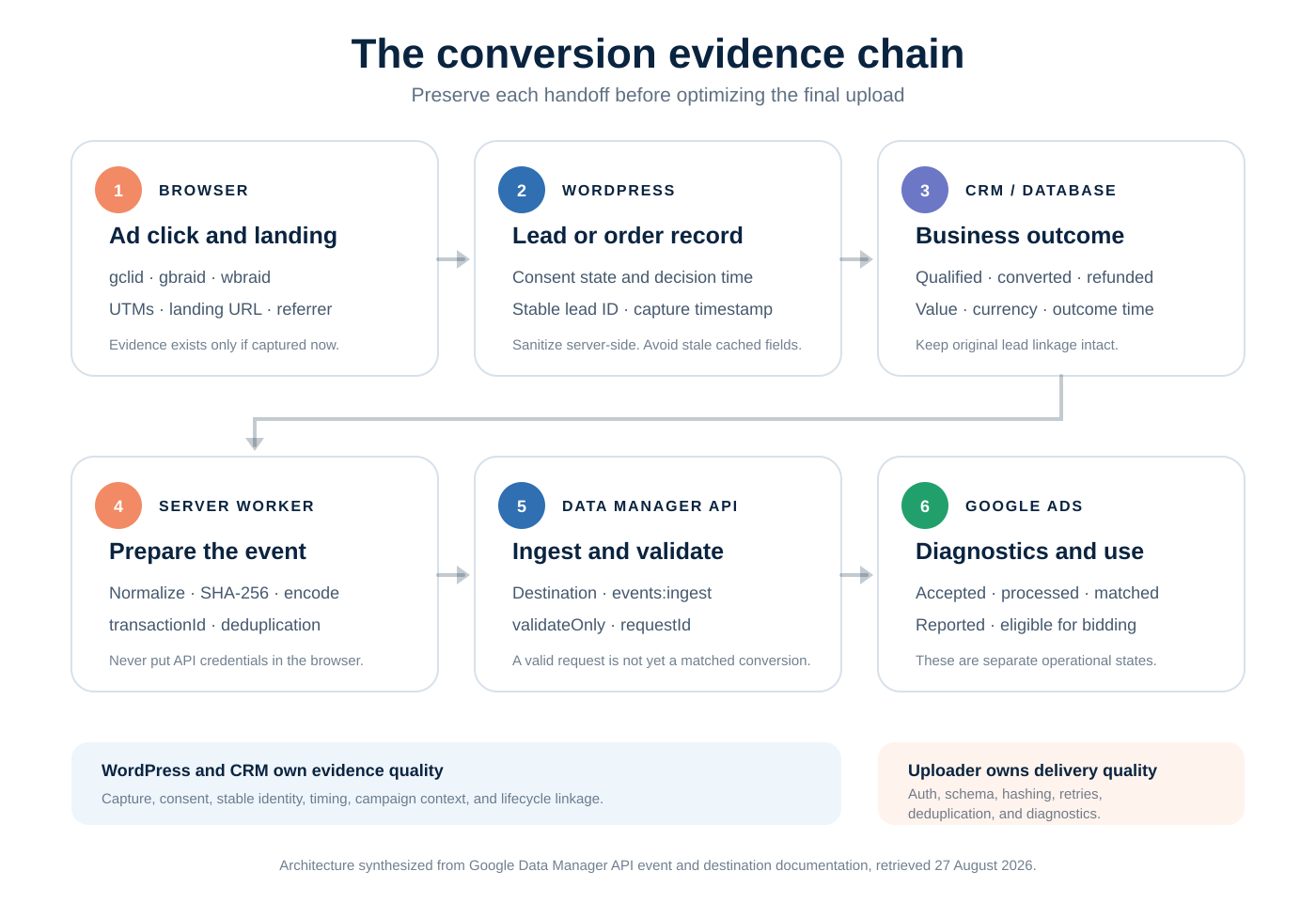
The business event normally happens after the web session:
- A visitor clicks an ad and reaches a WordPress landing page.
- WordPress creates a lead or order.
- A salesperson qualifies the lead hours or days later.
- A CRM or backend emits an offline conversion.
- Google attempts to match the conversion to an eligible ad interaction.
If step 2 drops the click ID, consent state, or durable lead key, no later API redesign can reconstruct it reliably. A richer upload endpoint cannot repair missing source data.
The reporting windows are part of the architecture
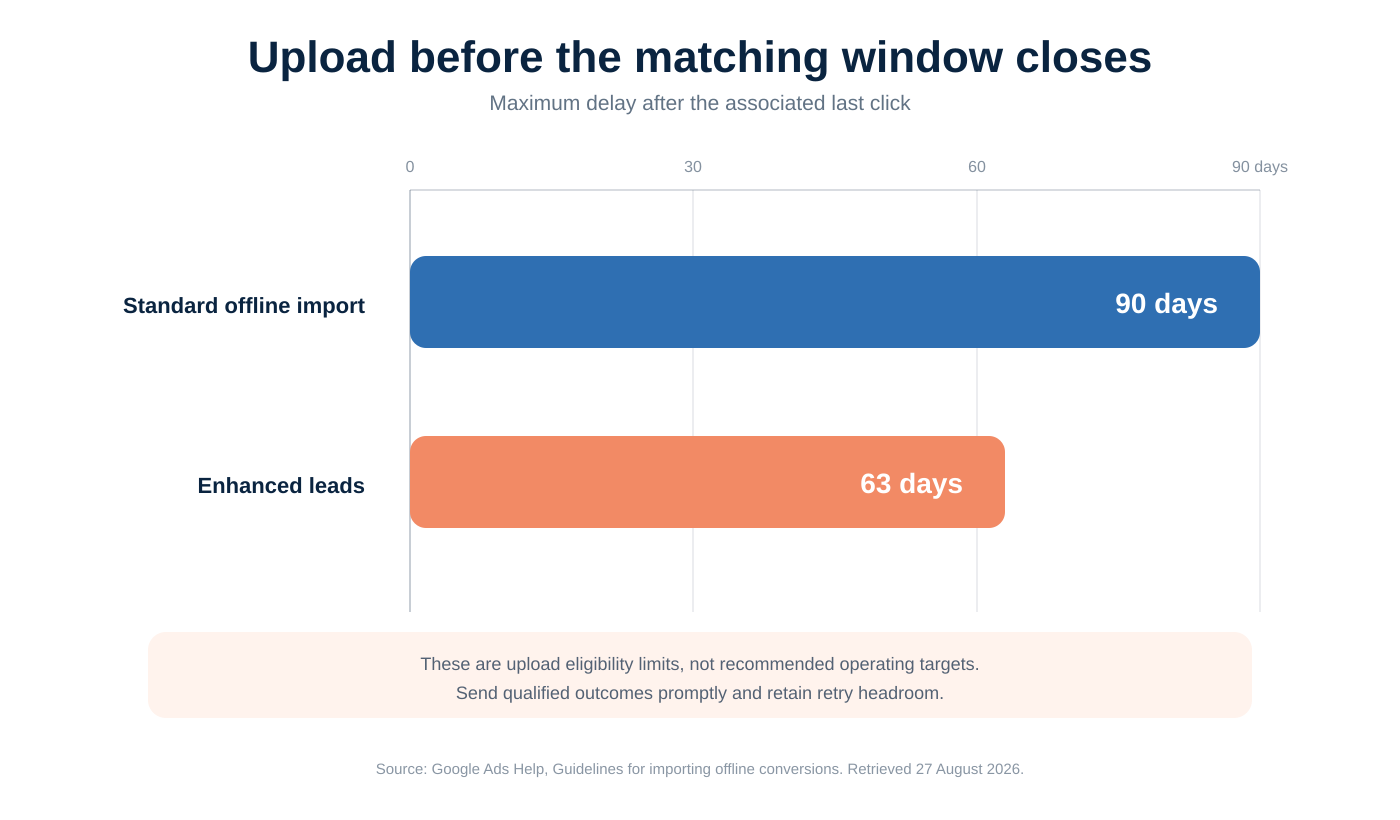
Google’s upload guidelines document two important limits measured from the associated last click:
- Standard offline conversion imports older than 90 days are not imported.
- Enhanced conversions for leads older than 63 days are not imported.
These are not queue targets. They are ceilings. A reliable integration uploads soon after the CRM milestone, then uses retries and monitoring for temporary errors.
What WordPress must preserve
Think of the form submission as an attribution envelope around the lead. The CRM may add qualification, revenue, and lifecycle timestamps later, but it should not need to guess how the visitor arrived.
| Field group | Examples | Why it matters |
|---|---|---|
| Stable record key | lead_id, order ID, submission UUID |
Joins WordPress, CRM, retry queue, and Data Manager response logs. It can also seed a stable transactionId. |
| Ad identifiers | gclid, gbraid, wbraid |
Direct ad-interaction match keys supported by Data Manager. Preserve the exact value without trimming or case changes. |
| Campaign context | utm_source, utm_medium, utm_campaign, utm_content, utm_term |
Useful for CRM reporting and troubleshooting, even when Google matches with another identifier. UTMs are not a substitute for every Google match key. |
| Landing context | Full landing URL, referrer, first landing timestamp | Explains where capture happened and helps diagnose redirects, caching, and overwritten attribution. Store only what your policy permits. |
| First-party data | Email, phone, selected address fields | Can support enhanced conversions for leads after required normalization, hashing, consent, and policy checks. |
| Consent evidence | Purpose, state, source, timestamp, policy version | Prevents a later worker from treating every stored contact as eligible advertising data. |
| Lifecycle data | Lead-created time, qualified time, converted time, value, currency | Defines which business event happened and when. The conversion timestamp is the event time, not the upload time. |
| Delivery state | Attempt count, request ID, status, last error category | Makes retries and diagnostics observable without logging raw personal data. |
Preserve raw capture and derived attribution separately
A practical record has two layers:
- Raw capture: exact query identifiers, full allowed landing URL, referrer, timestamp, and consent evidence as observed.
- Derived attribution: normalized channel, first-touch campaign, latest-touch campaign, or reporting labels calculated from rules.
This prevents a classification-rule change from rewriting historical evidence. You can recompute a reporting label later, but you cannot recover a dropped gclid or an overwritten landing URL.
First-touch and latest-touch answer different questions
Do not force one campaign field to serve every report. First-touch describes acquisition. Latest eligible touch describes the most recent campaign before the lead. Google Ads matching uses its own eligible identifiers and attribution rules.
For a returning visitor, append the new visit to a bounded journey or preserve separate first and latest fields. Avoid silently replacing the only stored record. If storage must stay minimal, keep at least:
- first landing context;
- latest eligible campaign context;
- exact ad identifiers still needed for delivery;
- lead creation and conversion timestamps.
Why combine click IDs and first-party match data
Google reports that advertisers combining first-party data with GCLID saw a median 10% increase in measured conversions compared with standard offline imports. This is a reported median across participating advertisers, not a forecast or guarantee for one account.
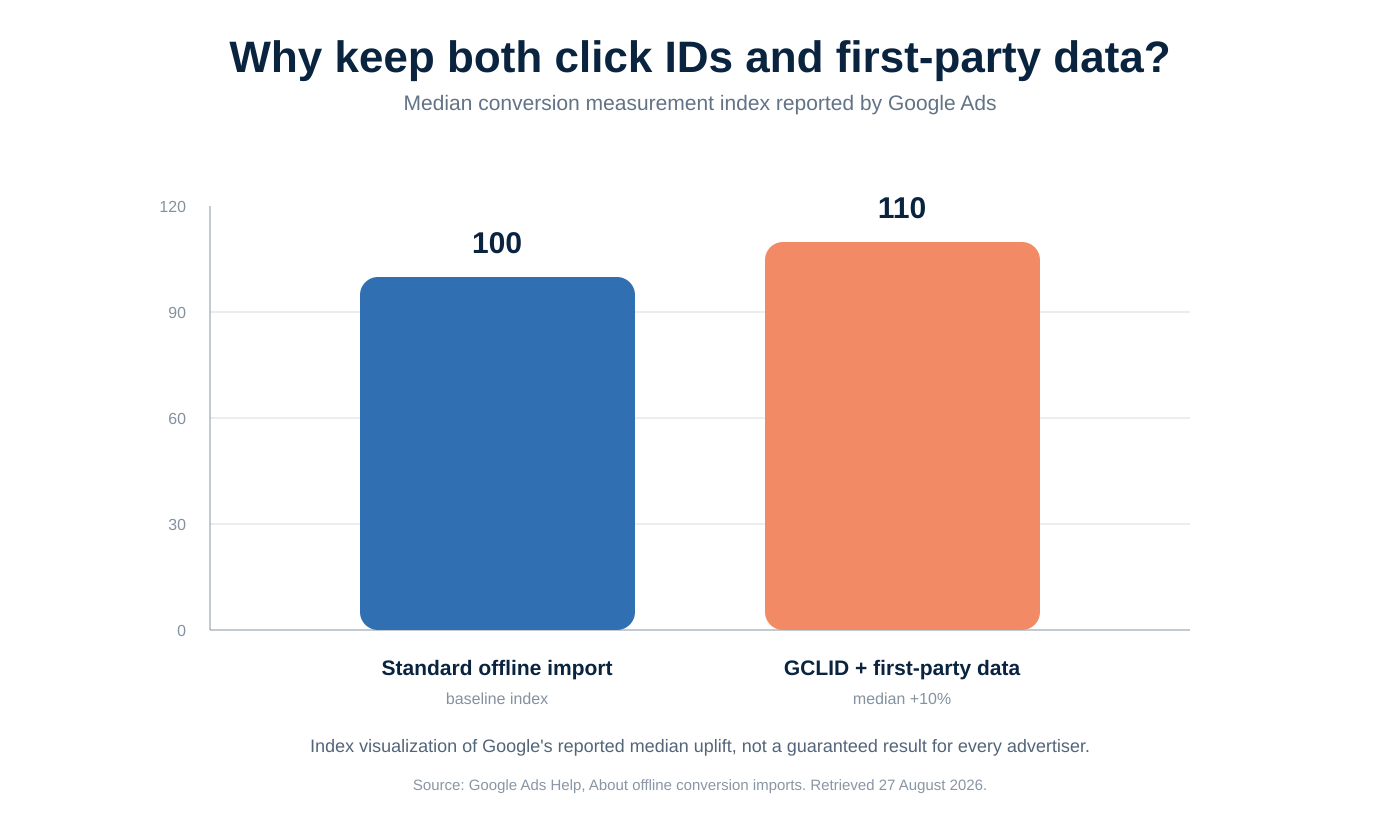
The engineering lesson is narrower: keep both eligible identifier classes when consent and policy allow. Do not discard the click ID because an email exists, or discard approved first-party data because a click ID exists.
Three clean implementation paths
WordPress is not listed as a direct source in Google’s current Data Manager supported-source table. That does not require a large custom plugin. Choose the shortest path your existing stack already supports.
1. WordPress to CRM to Data Manager
Use this when the CRM already owns lead status and sales outcomes.
WordPress sends the lead, attribution envelope, and consent evidence to the CRM. The CRM’s supported Data Manager connector or a small backend integration uploads qualified_lead and converted_lead events.
This is usually the cleanest path because sales outcome data already lives in the CRM. The critical test is whether the CRM preserves the original identifiers instead of accepting only contact and campaign-name fields.
If you use a generic webhook, define a stable contract rather than forwarding every form field. FunnelSheet’s webhook and CRM integration guide shows the boundary from capture to downstream delivery.
2. WordPress to a supported data source
Use this when your team already runs data operations in a supported source such as BigQuery, Cloud Storage, Google Sheets, HTTPS, MySQL, PostgreSQL, Salesforce, Snowflake, or another listed connector.
WordPress writes or exports the allowed record. Your CRM or data job adds the lifecycle outcome. Data Manager imports the mapped rows on a schedule.
This path reduces API code, but it does not remove data modeling. Confirm column types, timestamps with timezone, consent, identifiers, update cadence, and duplicate behavior before enabling a primary conversion action.
3. WordPress to a server-side Data Manager worker
Use this when you need event-level control, near-real-time uploads, explicit retries, or a custom CRM.
The worker should:
- receive or read an eligible CRM milestone;
- join it to the original WordPress lead key;
- verify consent and required identifiers;
- normalize and hash required user data;
- create a stable transaction ID;
- call
events:ingestwithvalidateOnly: trueduring testing; - store the returned request ID or compact error category;
- retry only errors that are safe to retry.
Do not call Data Manager from page JavaScript. A browser cannot safely hold OAuth credentials, and an ad blocker, navigation, or network interruption can terminate the request.
Code examples: from WordPress capture to Data Manager validation
The following examples are deliberately small. They show the contract, not a universal plugin. Adapt the form selectors, consent event, storage, and authentication to your stack.
1. Put current-page identifiers into hidden form fields
This browser example reads only the current URL and runs after your consent platform emits a marketing-consent event. It does not solve cross-page or returning-visitor persistence by itself.
const attributionKeys = [
  'gclid', 'gbraid', 'wbraid',
  'utm_source', 'utm_medium', 'utm_campaign', 'utm_content', 'utm_term'
];

function fillAttributionFields(form) {
  const params = new URLSearchParams(window.location.search);

  for (const key of attributionKeys) {
    const input = form.elements.namedItem(key);
    const value = params.get(key);
    if (input && value) input.value = value;
  }
}

window.addEventListener('marketing-consent-granted', () => {
  document.querySelectorAll('form[data-attribution]').forEach(fillAttributionFields);
}, { once: true });
Create matching hidden inputs in the form:
<form data-attribution method="post">
  <input type="hidden" name="gclid">
  <input type="hidden" name="gbraid">
  <input type="hidden" name="wbraid">
  <input type="hidden" name="utm_source">
  <input type="hidden" name="utm_medium">
  <input type="hidden" name="utm_campaign">
  <!-- Your visible fields and submit button -->
</form>
Production sites often need cross-page persistence, first/latest-touch rules, form integrations, and cache-safe handling. Reuse an existing attribution layer instead of duplicating that logic in each form. ClickTrail can preserve first and latest touch, Google click IDs, and consent-aware form context; its FAQ documents the data boundary. It does not replace the server-side Data Manager destination.
2. Sanitize WordPress form input before storage
Browser values are untrusted. Sanitize on the server, keep an allowlist, and cap lengths before writing to post meta, order meta, or a CRM payload.
function fs_attribution_fields(array $input): array {
    $keys = [
        'gclid', 'gbraid', 'wbraid',
        'utm_source', 'utm_medium', 'utm_campaign', 'utm_content', 'utm_term',
    ];
    $result = [];

    foreach ($keys as $key) {
        if (!isset($input[$key]) || !is_string($input[$key])) {
            continue;
        }

        $value = sanitize_text_field(wp_unslash($input[$key]));
        if ($value !== '') {
            $result[$key] = mb_substr($value, 0, 512);
        }
    }

    return $result;
}

$attribution = fs_attribution_fields($_POST);
This function does not decide consent, persistence duration, or who can read the fields. Those are application and policy decisions. If WooCommerce owns the conversion record, attach the envelope to the order once and reuse it downstream; see the WooCommerce attribution integration for that flow.
3. Normalize and hash first-party identifiers on the server
Google’s formatting guide requires SHA-256 for applicable user data. Email and phone normalization happen before hashing. Gmail and Googlemail local parts require additional dot and plus-suffix handling. Phone numbers should be E.164.
import { createHash } from 'node:crypto';

const sha256Hex = value =>
  createHash('sha256').update(value, 'utf8').digest('hex').toUpperCase();

function normalizeEmail(value) {
  const email = value.trim().toLowerCase();
  const at = email.lastIndexOf('@');
  if (at < 1) throw new Error('Invalid email address');

  let local = email.slice(0, at);
  const domain = email.slice(at + 1);
  if (domain === 'gmail.com' || domain === 'googlemail.com') {
    local = local.split('+', 1)[0].replaceAll('.', '');
  }

  return `${local}@${domain}`;
}

function normalizeE164(value) {
  const phone = value.replace(/[\s().-]/g, '');
  if (!/^\+[1-9]\d{7,14}$/.test(phone)) throw new Error('Phone must be E.164');
  return phone;
}

const emailHash = sha256Hex(normalizeEmail('[email protected]'));
const phoneHash = sha256Hex(normalizeE164('+351 912 345 678'));
Hashing is not consent. It reduces exposure of the identifier in transit, but the value remains advertising data governed by your legal basis, notices, retention policy, access controls, and Google’s EU user consent policy.
4. Validate a Data Manager request before applying it
The Data Manager API accepts POST https://datamanager.googleapis.com/v1/events:ingest. For Google Ads offline conversions and enhanced conversions for leads, productDestinationId must reference a conversion action whose type is UPLOAD_CLICKS. The operating account must own that conversion action.
The payload below is a schema-grounded template. Replace every uppercase placeholder with your own approved value. The email value must already be normalized, SHA-256 hashed, and HEX encoded.
{
  "destinations": [
    {
      "operatingAccount": {
        "accountType": "GOOGLE_ADS",
        "accountId": "GOOGLE_ADS_CUSTOMER_ID"
      },
      "loginAccount": {
        "accountType": "GOOGLE_ADS",
        "accountId": "GOOGLE_ADS_LOGIN_CUSTOMER_ID"
      },
      "productDestinationId": "UPLOAD_CLICKS_CONVERSION_ACTION_ID"
    }
  ],
  "encoding": "HEX",
  "consent": {
    "adUserData": "CONSENT_GRANTED",
    "adPersonalization": "CONSENT_GRANTED"
  },
  "events": [
    {
      "adIdentifiers": {
        "gclid": "CAPTURED_GCLID"
      },
      "userData": {
        "userIdentifiers": [
          { "emailAddress": "SHA256_HEX_EMAIL" }
        ]
      },
      "eventTimestamp": "2026-08-27T14:30:00+01:00",
      "transactionId": "LEAD_4827_QUALIFIED",
      "eventSource": "WEB",
      "conversionValue": 250.00,
      "currency": "EUR"
    }
  ],
  "validateOnly": true
}
Send it from a protected server process with the Data Manager OAuth scope:
curl --fail-with-body \
  -X POST 'https://datamanager.googleapis.com/v1/events:ingest' \
  -H "Authorization: Bearer $ACCESS_TOKEN" \
  -H 'Content-Type: application/json' \
  --data-binary @event.json
Start with validateOnly: true. Google says this validates the request without applying changes. When validation passes and the conversion action, consent, timestamps, and identifiers are confirmed, change it to false in the controlled worker. A successful request returns a requestId; retain that identifier with the batch, not with raw PII in general logs.
Use a stable transaction ID
For the same Google Ads conversion action, Data Manager uses transactionId to deduplicate events sent from multiple sources. Generate it from a durable business event, not from the upload attempt.
Good:
lead_4827_qualified
order_9931_paid
deal_18_converted
Risky:
2026-08-27T14:31:11Z
retry_3
random_uuid_created_for_each_attempt
If a timeout occurs after Google accepted the request but before your worker received the response, the retry should reuse the same transaction ID.
How to verify the whole pipeline
A successful form submission is not proof of a successful offline conversion. Verify the chain in layers and stop at the first broken handoff.
| Layer | Check | Evidence to retain |
|---|---|---|
| Landing page | Expected click ID or campaign parameter reaches the final URL after redirects | Redacted URL test and redirect trace |
| Consent | Marketing storage and later upload follow the recorded state | Purpose, state, timestamp, policy version |
| Form | Hidden field exists and contains the allowed exact value at submit time | Browser network payload with PII removed |
| WordPress | Server receives, sanitizes, and stores or forwards the field once | Lead/order ID and boolean field-presence checks |
| CRM | Original lead key and identifiers survive lifecycle updates | Redacted field mapping and sample join |
| Worker | Conversion action, event time, consent, value, and transaction ID are correct | Validation response and request ID |
| Google Ads | Upload diagnostics accept and process the event | Data Manager request status and Google Ads diagnostics |
| Reporting | Imported action has the intended primary/secondary and goal configuration | Conversion-action settings and controlled test record |
Common failure patterns
| Symptom | Likely cause | Next check |
|---|---|---|
| Form submits, CRM record has no click ID | Redirect dropped parameters, consent code ran too late, hidden field name mismatch, or cached page omitted integration code | Inspect final landing URL and submitted request payload |
validateOnly fails |
Wrong account type, login account, conversion action ID, timestamp, enum, hash encoding, or identifier format | Compare the smallest payload against the current REST schema |
| Request succeeds but no conversion appears | Processing delay, ineligible/old click, wrong conversion action, missing match data, or consent/policy issue | Check request status and Google Ads diagnostics before retrying |
| Duplicate conversions | New transaction ID generated on each retry or multiple sources use different IDs for the same event | Define one ID from the business milestone |
| Low match coverage | Identifier was overwritten, first-party data was normalized incorrectly, click ID was lost, or upload arrived outside the eligible window | Compare source record, payload builder, and timing |
| Wrong conversion date | Worker used upload time instead of the CRM event timestamp | Trace the original qualified/converted timestamp and timezone |
Protect logs while debugging
Do not print full request bodies, access tokens, raw emails, phone numbers, or landing URLs containing personal data. Useful logs can contain:
- internal batch ID;
- conversion action ID;
- event count;
- booleans for identifier presence;
- event-time range;
- transaction IDs if they are non-sensitive internal keys;
- HTTP status and compact error category;
- Data Manager request ID.
Store detailed restricted evidence only where your incident process allows it, with a short retention period.
A low-risk migration plan
Google’s enhanced-conversions upgrade guide recommends monitoring upgraded conversion actions for one to two conversion cycles or up to four weeks before changing optimization settings. Use that period to compare delivery and data quality, not to upload one event and declare success.
Phase 1: inventory
- List every WordPress form, checkout, phone-lead path, and CRM status that feeds Google Ads.
- Identify the current uploader: manual file, connector, Google Ads API code, Data Manager source, or unknown job.
- Confirm the Google Ads conversion action, owner account, source type, primary/secondary status, and counting rule.
- Determine whether any legacy Google Ads API developer token is genuinely allowlisted. Record evidence, not an assumption.
Phase 2: make capture durable
- Preserve
gclid,gbraid,wbraid, approved first-party identifiers, landing context, and consent evidence. - Add a stable lead or order ID at creation.
- Verify the data survives WordPress-to-CRM mapping and later status changes.
- Keep raw capture separate from derived channel labels.
If you need help defining the capture layer, review our offline conversion tracking service. The implementation should remain portable: WordPress captures the envelope, while the selected CRM or worker owns delivery.
Phase 3: validate delivery
- Build the smallest eligible event.
- Use a secondary test conversion action where appropriate.
- Run Data Manager validation without applying changes.
- Apply a controlled test using non-production or properly authorized test data.
- Record the request ID and inspect Data Manager diagnostics.
Phase 4: compare before optimizing
Monitor for one to two conversion cycles or up to four weeks, depending on lead velocity. Compare:
- submitted, accepted, and processed event counts;
- missing-identifier rate;
- duplicate rejection rate;
- median time from CRM milestone to upload;
- match coverage and diagnostics;
- conversion value and currency accuracy.
Only then decide whether the new action should become primary or whether bidding should use it.
Mistakes to avoid
Treating UTMs as a complete Google Ads matching strategy
UTMs are valuable reporting context. They do not replace gclid, gbraid, wbraid, session attributes, or eligible first-party match data in every Data Manager use case.
Uploading from the browser
Browser uploads expose credentials and fail unpredictably during navigation, blocking, or poor connectivity. Capture in the browser; authenticate and deliver on the server.
Hashing before normalization
[email protected] and [email protected] produce different hashes. Apply Google’s field-specific normalization first, then SHA-256 and the declared HEX or Base64 encoding.
Calling every form submission a qualified lead
An initial contact and a qualified lead are different business events. Let WordPress create the lead, then let the CRM emit the milestone when the qualification rule is met.
Regenerating IDs on retry
A retry is the same event. Reuse the transaction ID or deduplication will not protect you.
Waiting until the upload window closes
The 90-day and 63-day windows are maximums. Upload promptly enough to investigate errors, correct mappings, and retry.
Frequently asked questions
Does WordPress connect directly to Google Ads Data Manager?
WordPress is not listed as a native Data Manager source in Google’s current source table. Route records through a supported CRM, database, HTTPS or file source, or a server-side Data Manager API worker.
Do I need both GCLID and hashed first-party data?
Not every event requires both. Data Manager accepts supported ad identifiers, session attributes, user data, or other eligible identifiers depending on the use case. When consent and policy allow, preserving both a click ID and correctly prepared first-party data gives the downstream matcher more usable evidence.
Should GCLID override UTM values?
Do not make one overwrite the other. Preserve the exact click ID as a matching identifier and UTMs as campaign context. Attribution classification can choose precedence later without destroying the raw fields.
What happens if consent is denied and later granted?
Your consent platform and legal policy determine what may be stored before consent. Do not retroactively claim a consent state. Record the granted state and timestamp, then allow eligible collection and delivery from that point under your policy. If you retained only in-memory context before consent, persist it only after the grant if that behavior is permitted and disclosed.
Which timestamp should the conversion use?
Use the time the qualified lead, sale, or other business event occurred, including a timezone. Do not substitute the API upload time.
How do I prevent duplicate conversions?
Use a stable transactionId for each business event within the conversion action and reuse it on retries. Keep the mapping consistent across every source that might send the same event.
Can ClickTrail upload directly to Data Manager?
ClickTrail handles consent-aware acquisition capture and can pass attribution to forms, WooCommerce, and webhooks. It is not presented as a native Data Manager destination. Connect its output to a supported CRM or your server-side uploader.
Final checklist
Sources and evidence boundary
This guide was checked against Google’s current documentation for offline conversion imports, upload windows and duplicate rules, Data Manager event ingestion, user-data formatting, REST ingestion, and supported sources.
We verified the documented schema, field rules, WordPress capture boundary, and code structure. We did not send customer data or run a production upload in an advertiser account for this article. Account eligibility, consent requirements, match coverage, and bidding impact must be verified in your own environment.
Updated 27 August 2026 to cover the Data Manager API path, legacy allowlisting nuance, timing windows, consent, deduplication, implementation patterns, code examples, and end-to-end diagnostics.