
# Google Ads WhatsApp Offline Conversions: Importing a Conversion That Started in a Chat
Key takeaways:
- "Offline conversion" in Google Ads means a conversion that did not happen on the website, so a qualified WhatsApp lead is a genuine offline conversion candidate.
- GCLID is a URL parameter passed with Google Ads ad clicks, enabled by auto-tagging, and used for offline conversion tracking; it reaches WhatsApp only if a tagged landing page persisted it before the handoff.
- With no GCLID, the viable match key is user-provided data sent through enhanced conversions for leads.
- From 15 June 2026, offline conversion imports and enhanced conversions for leads uploads are migrated to the Data Manager API and blocked in the Google Ads API; idle tokens from January to June 2026 lose legacy access.
- Deduplicate with a stable lead, deal, or transaction id plus the real event time so a retry does not double-count.
- A successful API response proves transport only, not that the event matched or reported.
What does "offline conversion" mean when the conversation happened in WhatsApp?
"Offline" here is not about connectivity. An offline conversion is any conversion that did not happen on the website — recorded instead in a CRM, a call center, or a messaging thread. A WhatsApp conversation that produces a qualified lead fits exactly: the event is real, but the automatic link back to the ad is missing.
That gap is the problem. A landing page receives a GCLID in its URL and can pass it into a conversion record. GCLID is a URL parameter passed with Google Ads ad clicks, enabled by auto-tagging, and used for offline conversion tracking. A WhatsApp thread receives a phone number, not an ad click identifier, because the handoff moves the conversation into a messaging client where no tagged URL loads.
Short answer: A WhatsApp conversation is a conversion that did not happen on your website, so Google Ads will not observe it on its own. If the journey began as a Google Ads click on a tagged landing page, that click carried a GCLID you can persist before the visitor hands off to WhatsApp, then upload later as the match key. If the conversation started inside WhatsApp with no prior web session, there is no GCLID to send, and the only viable match key is user-provided data through enhanced conversions for leads. Either way the upload should run server-side after 15 June 2026 through the Data Manager API, carry a stable transaction id and the true business event time, and be verified as a pipeline of states — captured, uploaded, processed, matched, reported — not as a single success response.
Why a WhatsApp lead usually has no GCLID
Auto-tagging appends the click identifier to the landing-page URL when a visitor arrives from an ad, and it stays there until your capture layer stores it in a first-party record. When the visitor taps a click-to-chat link, that browser context is gone; the agent sees a message, not a query string. Two cases follow:
- Journey started on a tagged landing page. The GCLID was in the URL. If your site persisted it before the handoff — to a CRM record or a prefilled message reference — the later conversion can still be matched with it.
- Conversation started inside WhatsApp. First contact came from an organic message, a saved contact, or a referral, so no GCLID exists.
A GCLID is only usable if the handoff preserved it — the boundary covered in capturing a WhatsApp GCLID into your CRM. Never persisted at the click, it cannot be reconstructed.
Which match key applies: GCLID or user-provided data?
Google Ads accepts two practical match keys for a WhatsApp-sourced conversion. You use whichever one the flow actually produced.
| Dimension | GCLID | User-provided data (enhanced conversions for leads) |
|---|---|---|
| What it is | Click identifier from the ad interaction | Hashed first-party identifiers, such as email or phone |
| When you have it | Tagged landing page, value persisted before handoff | Chat captured an eligible, consented identifier |
| How it is obtained | Read from the landing URL at capture time | Collected in the conversation, normalized, hashed server-side |
| Match role | Direct match to the ad click | Supplements or replaces the click identifier |
Enhanced conversions for leads is the recommended upgrade over offline conversion import. It uses user-provided data — for example a hashed email — to supplement the imported data. Google reports that advertisers who used first-party data alongside GCLIDs saw a median 10% increase in conversions versus standard offline conversion imports. That is a reported median, not a forecast for any single account.
Neither key is automatic in a chat: a GCLID requires deliberate capture before handoff, and user-provided data requires an eligible, consented identifier you can normalize and hash. If neither holds, the lead is a real business event but cannot be imported as a matchable conversion.
What are the states to verify: captured, uploaded, processed, matched, reported?
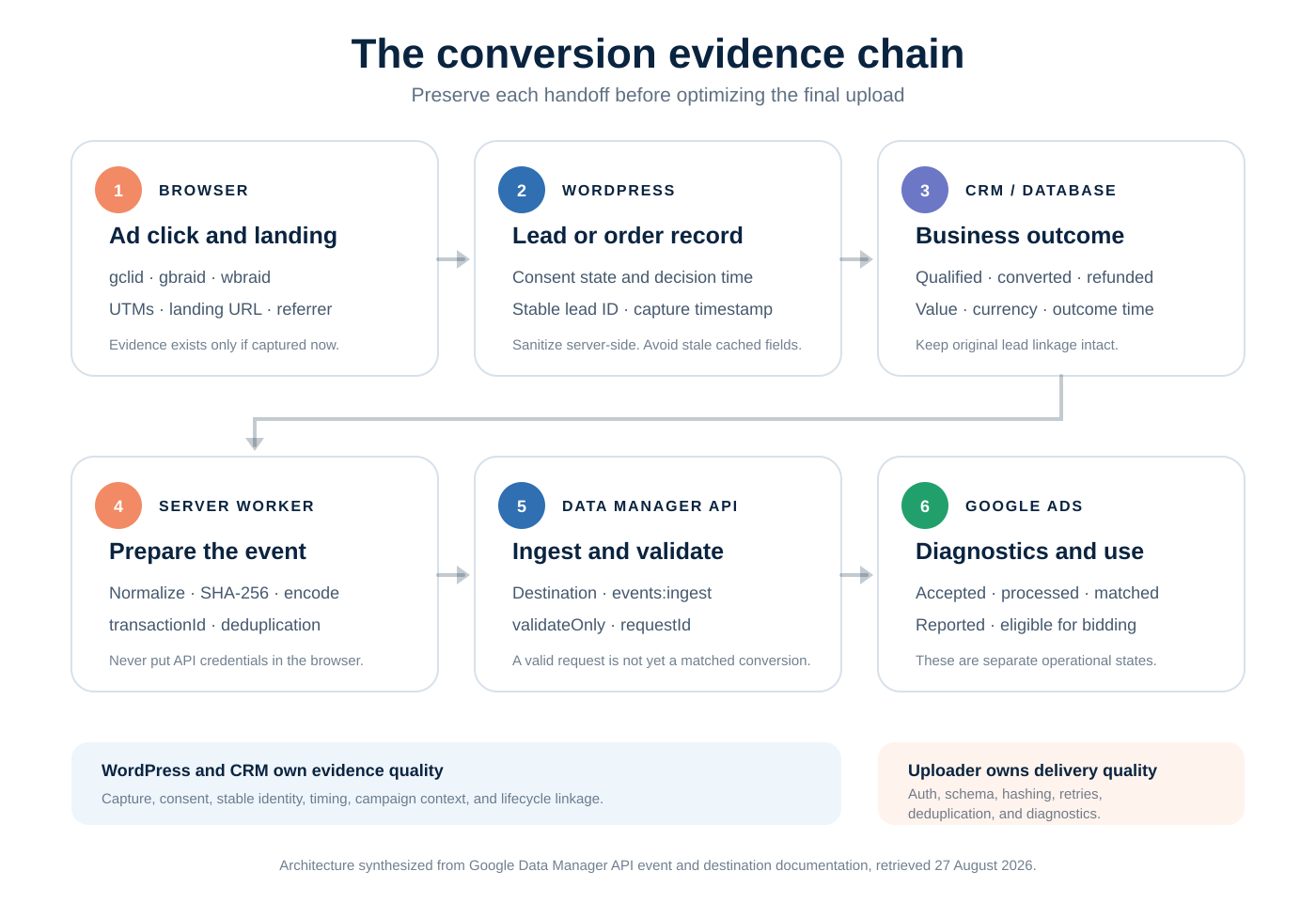
A WhatsApp offline conversion is a chain of five states, each able to fail independently. Treating a single HTTP 200 as done hides where the chain broke.
| State | What it means | Where to observe it | Common false positive |
|---|---|---|---|
| Captured | A stable lead id and the identifier (GCLID or user-provided data) sit on a durable record | Form, CRM lead, or server-side store at handoff time | The thread exists, but no identifier was persisted |
| Uploaded | A server-side job sent the event to the Data Manager API | Worker logs and the returned request id | A retry re-sent the event with a new id |
| Processed | Google accepted and began processing the event | Data Manager request status | "Accepted" read as "matched" |
| Matched | The event was attributed to an eligible ad interaction or user | Conversion diagnostics for the action | Match assumed from a successful upload |
| Reported | The conversion appears against the intended conversion action | Conversion action reporting and settings | Wrong action, or counted twice |
Observe the states in order and stop at the first broken link. A healthy upload with no match usually points back to a capture problem, not a delivery one.
Why does the 15 June 2026 Data Manager migration matter?
From 15 June 2026, offline conversion import and enhanced conversions for leads uploads are migrated to the Data Manager API and blocked in the Google Ads API. Developer tokens that had not sent a request between January 2026 and June 2026 lose legacy access (source).
For a WhatsApp workflow the consequence is concrete: if you planned to push chat-sourced conversions through the legacy Google Ads API upload endpoints, that transport no longer exists. Plan the route, not just the payload. The wider implications are covered in moving offline conversions to the Data Manager API.
Google Ads Data Manager is a point-and-click first-party data import layer whose concepts are a data source, a connection, and a destination; both GCLID and user-provided data can serve as match keys, which makes it usable for chat-sourced leads. Google documents a separate path for importing phone call conversions, so a lead that resolves through a call follows a different workflow.
How do you deduplicate a WhatsApp offline conversion?
Retries are normal in any server-side integration, so deduplication must be designed in:
- A stable id. Derive one identifier from the business event — a lead id, deal id, or transaction id — and reuse it on every retry. Do not mint a fresh id per attempt.
- The real event time. Use the moment the business event occurred, including timezone, not the upload time.
Good identifiers describe the event (lead_4827_qualified, deal_18_won); risky ones describe the attempt (retry_3, a random UUID per call). If a request times out after Google accepted it but before your worker saw the response, the retry must reuse the id so it collapses into one conversion.
What does a successful API response actually prove?
A successful response proves transport only: your authenticated server-side request was accepted and you received a request id. It does not prove the event matched a click or a user, or that the conversion reported against the intended action.
Matching depends on identifier quality and eligibility; reporting depends on processing, conversion action configuration, and attribution settings. Keep the request id, then verify processed, matched, and reported separately.
A test matrix
Isolate one variable per test, using a secondary test conversion action where available.
| Test | Setup | Expected observable | Interpretation |
|---|---|---|---|
| No-identifier control | Send a chat lead with no GCLID and no user-provided data | Upload may be accepted but does not match | Confirms a capture gap |
| GCLID available | Tagged landing page; persist the GCLID; hand off to chat | Event matches to the ad click | Capture-before-handoff works end to end |
| User-provided data only | Begin in WhatsApp; capture and hash a consented identifier | Event matches via user-provided data | The no-GCLID path is viable |
| Duplicate retry | Re-send the same event with the same transaction id | No double count | Deduplication holds |
| New id on retry | Re-send the same event with a freshly generated id | Risk of two conversions | Shows why ids must be stable |
| Wrong event time | Upload using the retry timestamp instead of the event time | Conversion dated incorrectly | Use the business event time |
To have this pipeline designed and verified against your own conversion action, see our offline conversion tracking service.
Frequently asked questions
Can a WhatsApp lead have a GCLID?
Only if a tagged landing page captured the GCLID and persisted it before the conversation moved into WhatsApp. If first contact happened inside WhatsApp, there was no ad-click URL, so no GCLID exists.
If I have no GCLID for a WhatsApp lead, what should I upload?
Use user-provided data through enhanced conversions for leads: capture an eligible identifier during the conversation, normalize it, hash it server-side, and send it as the match key. Google positions enhanced conversions for leads as the recommended upgrade over standard offline conversion import.
Does an accepted upload mean the conversion matched?
No. An accepted upload proves transport only. Matching and reporting are separate states you observe independently; a request id says nothing about whether the event matched or appeared in reporting.
Why does the June 2026 migration change my WhatsApp workflow?
The transport you may have planned is gone. From 15 June 2026, offline conversion imports and enhanced conversions for leads uploads are migrated to the Data Manager API and blocked in the Google Ads API, and idle tokens lose legacy access. Build the workflow for Data Manager and verify the destination conversion action first.
Sources
- GCLID and auto-tagging: https://support.google.com/google-ads/answer/9744275 (retrieved 2026-09-17)
- Offline conversion imports, enhanced conversions for leads, the 15 June 2026 migration, and developer token allowlisting: https://support.google.com/google-ads/answer/2998031 (retrieved 2026-09-17)
- Google Ads Data Manager concepts, connections, and match keys: https://support.google.com/google-ads-data-manager/answer/13761872 (retrieved 2026-09-17)
- Importing phone call conversions: https://support.google.com/google-ads/answer/6301373 (retrieved 2026-09-17)