

The report was short: “VooAward chat is not working.” The confusing part was that the website loaded, the chat button rendered, and the panel opened. Nothing in that first browser check looked broken.
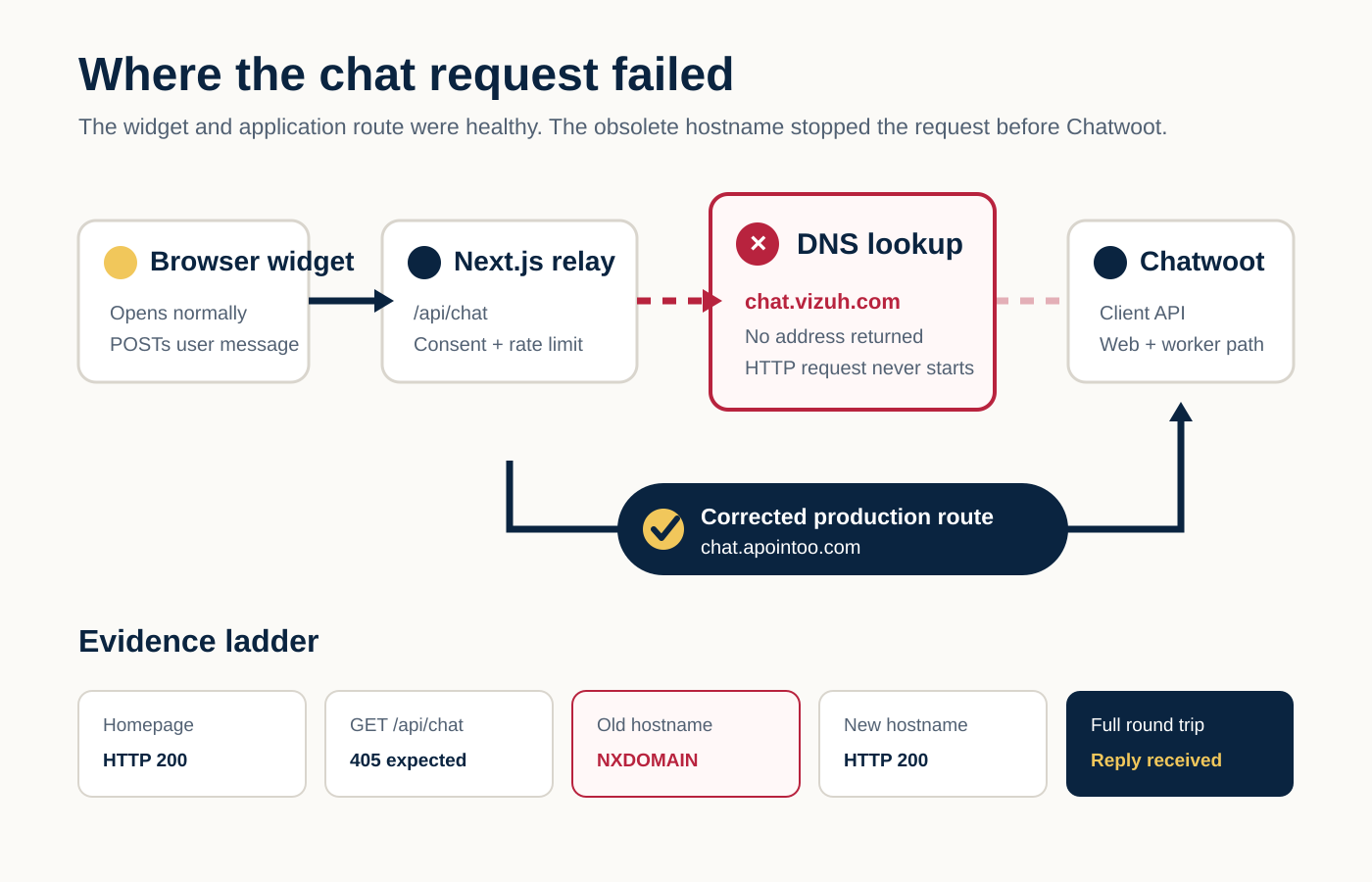
The failure sat one layer deeper. The application’s server-side relay still pointed to an obsolete Chatwoot hostname. That hostname no longer resolved, so the request could not reach Chatwoot, its web process, its workers, or the reply automation behind it.
We changed one production environment value and the matching code comment, rebuilt and deployed the Docker image, then verified a complete consented conversation. The final production test returned HTTP 200, a non-empty reply, and reusable Chatwoot conversation state.
This is the case study of that incident and a repeatable way to diagnose the same class of Chatwoot failure.
Original incident evidence: we tested the live request path, reviewed the exact commit diff and deployment timeline, and ran one final synthetic conversation after deployment.
Evidence boundary: the original report did not include a browser-console capture or screenshot of the error. We verified that the widget opened. The application source maps an upstream 502 or unavailable 503 to a generic “try again” message, but the exact text seen by the original user was not captured.
System context
This was not Chatwoot’s standard embedded web widget. The site used a custom React chat interface and Chatwoot’s public Client API. The browser never received the Chatwoot base URL or inbox identifier.
Visitor
  ↓
VooAward chat widget in the browser
  ↓ POST /api/chat
Next.js server route
  ↓ public Client API
Self-hosted Chatwoot web process
  ↓ webhook / asynchronous reply work
Chatwoot worker and reply automation
  ↓ outgoing message stored in Chatwoot
Next.js route polls for the reply
  ↓
Browser renders the answer
Chatwoot documents the Client API as the interface for custom messaging experiences. It uses an API inbox identifier and the contact identifier returned when a contact is created. The same public API exposes contact creation, message creation, and message listing on both cloud and self-hosted installations. See the Chatwoot API introduction, contact creation endpoint, message creation endpoint, and message-list endpoint.
The relevant production stack was:
- Next.js 15.5.12 for the website and
/api/chatrelay. - A Docker image based on Node 18 Alpine.
- Azure DevOps for the main-branch build.
- AWS ECR for the image.
- A Coolify deploy webhook after the image push.
- Cloudflare in front of the public website.
- A self-hosted Chatwoot endpoint served through Caddy.
PostgreSQL and Redis were part of the wider Chatwoot deployment, but they were not where this request failed. DNS resolution happened before any connection to those services was possible.
What the user experienced
The report described the chat as non-functional. Our first reproduction narrowed that down:
- The public site returned HTTP 200.
- The chat interface rendered and opened.
- The Next.js route existed.
- The consent guard responded.
That combination explains why the incident was confusing. A working shell can hide a broken server-to-server dependency. The browser was loading VooAward from its own domain; Chatwoot was contacted later by the Next.js server.
In this implementation, upstream failures become HTTP 502 and are converted by the widget into a friendly unavailable message. The detailed infrastructure error stays server-side. That is the right privacy boundary, but it means operators need backend evidence rather than relying on the message shown to a visitor.
How we investigated it
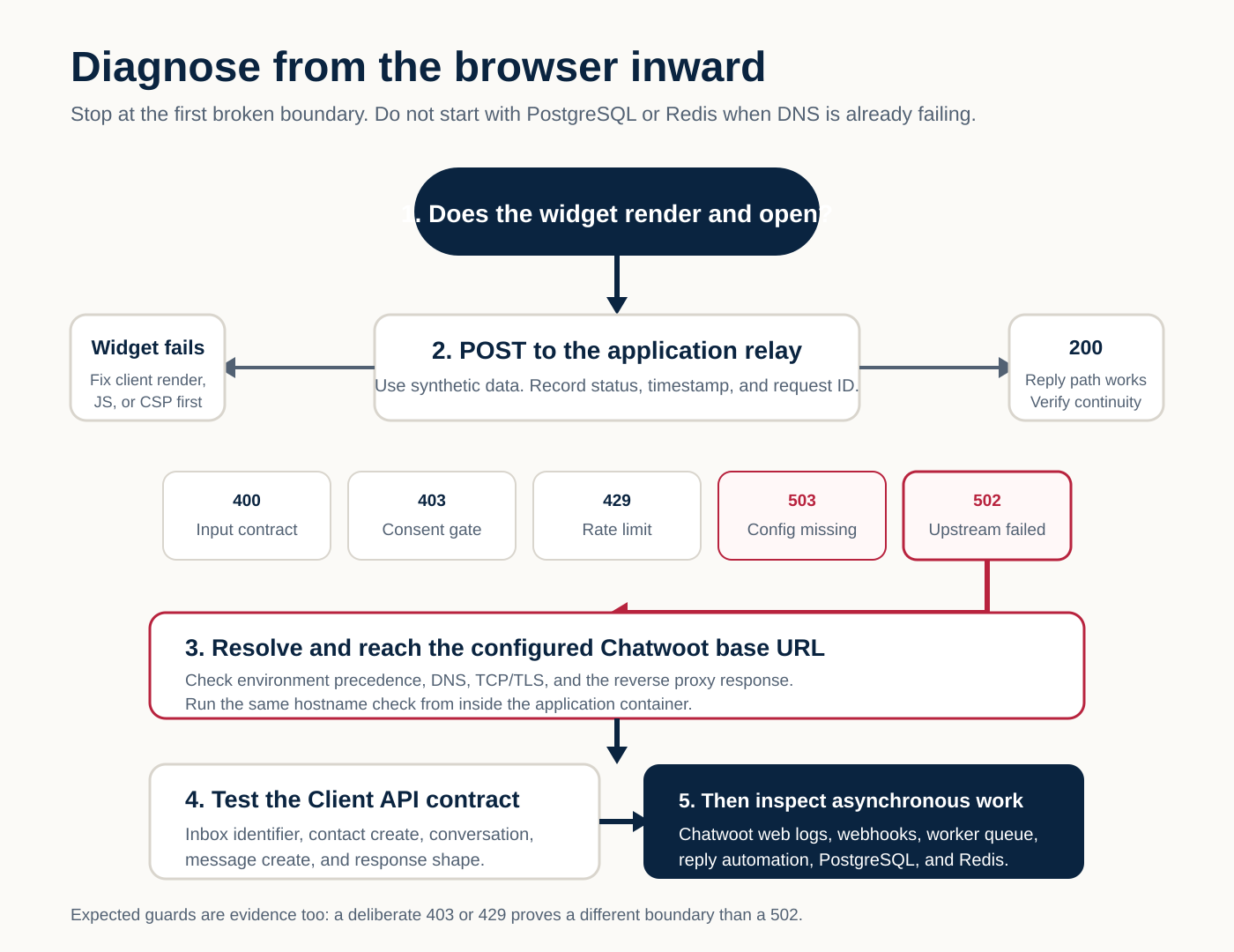
We worked from the browser inward and stopped at the first boundary that failed.
1. Prove the site and widget are separate from the reply path
We loaded the live site in a real browser and opened the widget. That ruled out a missing component, a basic hydration failure, and a completely broken page deployment.
We also checked the public route:
curl -sS -o /dev/null -w '%{http_code}\n' \
  https://www.vooaward.com/api/chat
It returned 405. That was expected because the route accepts POST, not GET. A 405 here proved the route was deployed. It did not prove Chatwoot was reachable.
2. Prove the consent gate without touching Chatwoot
We sent a synthetic request with consent denied:
curl -sS -X POST https://www.vooaward.com/api/chat \
  -H 'content-type: application/json' \
  --data '{"message":"deployment diagnostic","locale":"pt","consent":false}'
The result was HTTP 403 with:
{"error":"consent_required"}That was another expected result. The route rejects the request before creating a Chatwoot contact. It proved the guard worked, not the upstream integration.
3. Trace the server-side call chain
The route’s successful path was straightforward:
- Validate message length and rate limit.
- Require explicit consent.
- Require both Chatwoot environment variables.
- Create a contact and conversation when no reusable state exists.
- Post the incoming message.
- Poll for a new outgoing reply for up to 12 seconds.
- Return HTTP 200 or collapse the upstream failure into HTTP 502.
Every Client API URL was built from CHATWOOT_BASE_URL. The configuration check only tested whether the value existed. It did not resolve the hostname or make a health request. A dead but non-empty URL therefore passed the 503 configuration guard and failed later as a 502 upstream error.
4. Compare the configured host with the live Chatwoot host
The tracked production file contained:
CHATWOOT_BASE_URL=https://chat.vizuh.comWe compared that hostname with the active Chatwoot hostname:
for host in chat.vizuh.com chat.apointoo.com; do
  getent ahosts "$host"
  curl -sS -o /dev/null -w '%{http_code}\n' "https://$host"
done
The decisive result was:
chat.vizuh.com      curl: (6) Could not resolve host
chat.apointoo.com   HTTP 200
Node describes ENOTFOUND as a DNS lookup failure, while also warning that the code can represent lookup failures beyond a nonexistent hostname. In our case, the same resolver returned no address for the old host and a valid address for the replacement, and the replacement completed HTTPS successfully. That combination confirmed the hostname problem. See the official Node.js DNS documentation and Node.js error reference.
The root cause
Production had a valid-looking but obsolete Chatwoot base URL. Because the hostname did not resolve, the failure occurred in this order:
Next.js fetch()
  → operating-system hostname lookup
  → no address
  → no TCP connection
  → no TLS handshake
  → no reverse-proxy request
  → no Chatwoot Rails request
  → no database or worker activity for this message
This is why changing Chatwoot workers, Redis, PostgreSQL, webhook logic, Cloudflare rules, or the browser component would not have fixed the incident.
What we changed
The functional diff was one line:
-CHATWOOT_BASE_URL=https://chat.vizuh.com
+CHATWOOT_BASE_URL=https://chat.apointoo.com
We also changed the stale hostname in the header comment of the server-only Chatwoot client. The final commit touched two files with one addition and one deletion in each:
Front/.env.production: corrected the production base URL.Front/lib/chatwoot/client.ts: corrected the operational documentation beside the code.
We did not change the API route, polling logic, inbox identifier, consent handling, rate limit, Chatwoot configuration, workers, database, Redis, reverse proxy, or Cloudflare.
Why the environment change needed a new image
The Dockerfile copied the frontend into the image before the Next.js build:
COPY Front/ .
RUN npm run build
CMD ["npm", "start"]
That made a rebuild and redeploy part of the fix. Editing a local file or restarting an old image would not change the deployed artifact.
Next.js supports server-only environment variables through process.env and documents its environment loading order. It also warns that environment handling differs between build-time and runtime values. Check your own container’s actual environment precedence rather than assuming a repository file wins. See the official Next.js environment-variable guide.
In our repository, .env.production was already the deployment’s tracked configuration source. That is not a recommendation to commit secrets. The base URL is not a secret, but access tokens, passwords, API keys, and private credentials belong in protected deployment variables.
Why we updated the comment
The comment did not affect runtime. We changed it because operators use nearby documentation during incidents. Leaving the dead hostname in the client would make the next diagnosis slower and could cause the obsolete value to be copied back into configuration.
How we verified the fix
We used an evidence ladder. Each level proved a different part of the system.
| Check | Result | What it proved |
|---|---|---|
| Git diff validation | Passed | Patch had no whitespace or conflict errors. |
| Remote main branch | Correct commit | Production source contained the hostname fix. |
| Azure DevOps build 2426 | Succeeded | The corrected source built successfully. |
| Docker image push | Succeeded | The deployable image reached ECR. |
| Coolify deploy webhook | Succeeded | The deployment trigger ran. |
| Old hostname | NXDOMAIN | The original dependency remained invalid. |
| Corrected hostname | HTTP 200 | DNS, TCP, TLS, and the Chatwoot web entry point responded. |
| Site homepage | HTTP 200 | The public application remained available. |
GET /api/chat |
405 | The deployed route existed and enforced its method. |
| Consent denied POST | 403 | The consent guard still failed closed. |
| Consented synthetic POST | 200 | The full conversation path returned a reply. |
The final test intentionally created one synthetic Chatwoot conversation with no personal data. We filtered the response before recording it. It contained:
- HTTP 200.
- A non-empty 145-character reply.
- A contact source identifier.
- A numeric conversation identifier.
- No error field.
That last check was the first result that proved the complete production path, including the asynchronous reply work. A successful build or healthy Chatwoot homepage alone could not do that.
A repeatable Chatwoot troubleshooting workflow
Use this order for a custom Chatwoot widget or relay.
Step 1: identify where the browser sends messages
Do not assume a visible chat panel talks directly to Chatwoot. Inspect the browser Network panel and source configuration. The target may be:
- Chatwoot’s native widget endpoint.
- Your own
/api/chator backend relay. - An n8n or webhook endpoint.
- A serverless function.
Record the method, status, response body, and request timestamp. Do not copy customer content into a ticket or public log.
Step 2: interpret the relay status before changing anything
For this implementation:
400meant empty or oversized input.403meant consent was not granted.429meant the rate limiter was working.503meant required configuration was absent.502meant the Chatwoot or reply path failed after configuration was present.200meant a reply was returned.
Your application may use different codes. Read the route before treating every non-200 as the same outage.
Step 3: inspect the effective environment inside the running app
Check variable presence without printing secret values. For the base URL, print only the scheme and hostname if your operational policy permits it. Confirm whether Docker Compose, Coolify, Kubernetes, systemd, or another runtime overrides the repository’s .env.production.
Questions to answer:
- Is the base URL present?
- Is it the hostname you expect?
- Does the running container see the same value as the build?
- Was the image rebuilt after the change?
- Is a platform-level variable overriding the file?
Step 4: test DNS and HTTPS from the application’s network context
Run the checks from inside the app container when possible:
getent ahosts chat.example.com
curl -sS -o /dev/null -w '%{http_code}\n' https://chat.example.com
Interpret the boundary:
- No address: resolver, hostname, or DNS configuration.
- Address but connection timeout: routing, firewall, or service availability.
- TLS error: certificate, hostname mismatch, or proxy configuration.
- HTTP 4xx/5xx: the request reached an HTTP server; inspect that layer next.
- HTTP 200 on
/: the entry point is reachable, but the inbox API still needs testing.
Step 5: test the exact Chatwoot API surface
A healthy Chatwoot login page does not prove an API inbox identifier is valid. Test the same Client API path your application uses. Keep identifiers and tokens out of screenshots and shared logs.
For a custom Client API integration, validate in order:
- Contact creation returns a
source_id. - Conversation creation returns a numeric ID.
- Incoming message creation succeeds.
- Message listing returns the expected response shape.
- Outgoing replies can be distinguished from incoming, activity, and template messages.
Prefer staging. A production write test creates real Chatwoot records, so use a clearly labelled synthetic message, no PII, and a bounded number of requests.
Step 6: only then inspect Chatwoot web and workers
If DNS, TLS, and the exact API endpoint work but no reply arrives, move deeper:
- Chatwoot web-process logs for the request ID and status.
- Webhook delivery status and receiver logs.
- Sidekiq or other worker queues.
- Reply automation or bot logs.
- Conversation and message records in PostgreSQL.
- Queue and cache health in Redis.
- Timeout alignment between the relay and asynchronous worker.
Our relay waited 12 seconds. A healthy Chatwoot installation could still produce HTTP 502 if the reply arrived after that deadline. DNS and worker latency can therefore produce the same browser message while requiring different fixes.
Mistakes and edge cases to avoid
A working widget is not a working conversation
Rendering proves frontend delivery. It says nothing about server-only dependencies.
A 405 or 403 can be good evidence
Our GET 405 and consent-denied 403 were expected. Rewriting the route to remove those guards would have weakened the system without fixing Chatwoot.
Configuration presence is not reachability
isChatwootConfigured() only checked that both variables were non-empty. Add a deployment smoke check if host drift is likely, but keep it narrow. A startup dependency on an external service can turn a temporary outage into an application boot failure.
Root-page HTTP 200 is not an inbox test
The Chatwoot homepage can be healthy while an inbox identifier, API route, webhook, or worker is broken.
Environment precedence can hide the real value
A correct repository diff may not affect the running container if Coolify, Compose, Kubernetes, or another layer overrides it. Inspect the effective runtime value safely.
Do not expose identifiers and credentials while debugging
Chatwoot inbox identifiers are used by the public Client API, while dashboard and platform APIs use stronger credentials. Treat every value according to its actual role, and never paste access tokens, application passwords, cookies, or deployment webhooks into an article or issue.
Do not declare success at the commit or build stage
The original debugging session ended while build 2426 was still in progress. At that point, the code was corrected but production was unverified. We only closed the incident after the build, image push, deploy webhook, live guards, and consented round trip all passed.
Keep unrelated fixes out of an outage patch
The working tree already contained unrelated telemetry changes. We created an isolated hotfix from the production branch and touched two lines of runtime documentation/configuration. That made the deployment diff reviewable and prevented accidental release of unfinished work.
What we would improve next
The smallest preventive improvement would be a deployment smoke check that:
- Confirms the configured hostname resolves from the deployed network.
- Confirms HTTPS reaches the expected Chatwoot entry point.
- Keeps secret and inbox values out of logs.
- Runs one full synthetic conversation in staging, not on every production boot.
We would not make PostgreSQL, Redis, Sidekiq, or Chatwoot availability a hard startup dependency for the public website. The chat should fail closed and visibly while the rest of the application remains available.
The underlying lesson
The fix was one environment line. Finding it required separating five different claims:
- The page is online.
- The widget renders.
- The application route responds.
- The Chatwoot host is reachable.
- A full conversation returns a reply.
Those statements are not interchangeable. The same discipline applies to analytics and attribution systems: captured, stored, delivered, accepted, and reported are separate states. FunnelSheet applies that boundary-first approach in ClickTrail and in our broader measurement and integration work.
When a Chatwoot integration fails, start at the user-visible boundary, follow the exact request path, and stop at the first broken handoff. That produces a smaller fix and stronger proof than changing every component that could plausibly be involved.
Written by Hugo Carvalho at Vizuh from the incident’s Git history, deployment evidence, source code, and live verification performed on 27 August 2026. No customer message content, inbox identifier, access token, or secret value is included.